
We Found Your Law Firm's Remote Desktop Online – Will a Hacker Be Next?
A public Remote Desktop login can expose a path toward client data and firm systems. See what we found – and what your firm should do next.
Get your free Zero-Access Exposure Review™ | See security baseline services
We Found Your Law Firm's Remote Desktop Online – Will a Hacker Be Next?
Attackers do not need to know your firm by name. If an exposed remote desktop service is visible online, the internet may do the discovery work for them.
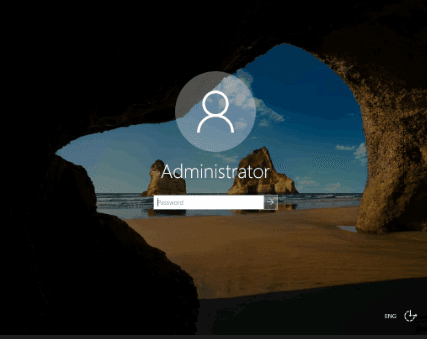
During a recent authorized external exposure review, we found a Windows Remote Desktop login associated with a law firm that was directly reachable from the public internet.
We did not guess a password. We did not exploit a vulnerability. We did not log in. We found it using the same kinds of internet search tools available to security researchers, IT providers, and attackers.
That distinction matters. The screenshot does not prove the password was weak or that the system had been compromised. But it does prove something the firm needed to know: a remote-control service was publicly reachable, and the login screen disclosed the name of a privileged account – Administrator.
This did not require sophisticated hacking
Search engines such as Shodan continuously catalog internet-connected systems and the services they expose. Shodan's documentation says its image search collects screenshots from services including Remote Desktop Protocol, or RDP. Its standard search results can also include the IP address, port, organization, hostname, service response, and time observed.
An attacker may not need to scan the internet from scratch. Some reconnaissance may already be organized and searchable.
Search-engine data can be historical, so any result still needs to be validated. But when a law firm's Remote Desktop login appears in a public index, the right question is not, "It is probably fine." It is, "Why is it visible, is it still reachable, and what protects it?"
"Aren't all of our computers connected to the internet?"
Connected to the internet is not the same as reachable from the internet.
Most computers in a law office sit behind a router or firewall and use private network addresses. They can initiate a connection outward – to visit a website, send email or reach a cloud service – but the router normally rejects an unsolicited connection coming in from a stranger on the internet.
Think of the router as the building's front desk. Employees can leave, but a visitor cannot walk into a private office simply because the building has a street address.
For Remote Desktop to become publicly reachable, something generally has to create a path through that outer layer. Examples include:
- A port-forwarding or firewall rule that sends internet traffic to the computer
- A device placed in a DMZ or assigned a public IP address
- A cloud-hosted Windows server exposed directly to the internet
- An old vendor or remote-support configuration that was never removed
- An automatic configuration feature, such as UPnP, that opened a path unexpectedly
The screenshot means that, when the service was observed, an internet connection reached the Remote Desktop service and the service responded with a login screen. The router may still have been present and protecting every other device. But for this particular service, the front desk had instructions to send visitors through.
What changes when Remote Desktop is publicly reachable?
The firm has not necessarily been breached. What changes is the opportunity available to an attacker:
- The login becomes available for continuous testing. Automated systems can repeatedly find and revisit exposed services without first targeting the firm by name.
- Stolen passwords become more dangerous. A password taken from another breach, phishing attack or infected device may now be tried against a live remote-access doorway.
- A visible username removes part of the guesswork. In this case, the screen disclosed the privileged account name "Administrator."
- Patching becomes more urgent. If the exposed service or operating system develops a remotely exploitable vulnerability, attackers already have a direct path to test it.
- One successful login may become an internal foothold. What an attacker can reach next depends on the account's privileges and the firm's network segmentation.
- The firm needs monitoring evidence. Someone should be reviewing failed logins, successful sessions and other remote-access activity – not merely assuming the router stopped it.
That is the practical meaning of external exposure: a service intended for authorized users is available for interaction from outside the firm's network. This is the same outside-in question addressed by External Attack Surface Management for law firms.
Remote Desktop is one obvious doorway, but it is not the only one. Cloud applications, client portals, file-sharing platforms, and recovery workflows can create internet-facing doors too.
Why a Remote Desktop screen should get a managing partner's attention
Remote Desktop lets someone control a Windows computer from somewhere else. That is useful for legitimate remote work and IT support. It is also why an exposed RDP service can be valuable to an attacker.
Depending on how the firm's network is designed and what the account can access, a successful login could create a path toward:
- Confidential client and matter files
- Document-management and practice-management systems
- Billing, accounting and trust-account information
- Microsoft 365, email and internal file shares
- Other workstations and servers reachable from the initial machine
Attackers can pursue that access with passwords stolen elsewhere, password spraying, repeated login attempts or vulnerabilities in outdated systems. A visible account name such as "Administrator" removes one more unknown from that process.
The danger is not theoretical. In an August 2026 joint advisory about Gunra ransomware, the FBI and CISA told organizations to prioritize known vulnerabilities in internet-facing systems, specifically including RDP-exposed infrastructure. The advisory describes a double-extortion model in which attackers steal data and encrypt systems – creating both a confidentiality crisis and an operations crisis.
For a law firm, that can mean more than an IT outage. It can mean inaccessible case files, delayed matters, forensic costs, notification analysis, possible extortion and difficult conversations with clients who expected their information to remain confidential. If an incident may already be underway, Attorney Incident Response: Your First 72-Hour Playbook explains the immediate decisions that matter.
Online does not automatically mean vulnerable – but it demands an answer
There are legitimate ways to provide remote access. Public visibility alone does not prove that an RDP service can be breached. It does increase the number of people who can test the controls protecting it. The same principle applies to other remote-access infrastructure, including the VPN and firewall exposure described here.
The important questions are straightforward:
- Does this Remote Desktop service still need to be publicly reachable?
- Can access be placed behind a secure gateway, VPN, zero-trust access service or strict IP allowlist?
- Are multifactor authentication and Network Level Authentication enforced?
- Is the system supported, fully patched and owned by a named person or provider?
- Are failed logins and successful remote sessions logged, monitored and reviewed?
- Is a privileged account such as Administrator exposed unnecessarily?
Do not settle for "we handle security." Ask your MSP to show you the configuration, access restrictions, patch status and monitoring evidence.
See what an attacker can see before an attacker acts
Most law firms do not intentionally publish a remote-control doorway. Exposure can linger after a temporary support change, an old vendor deployment, a firewall rule or a forgotten server.
That is the point of the Free Zero-Access Exposure Review™: to identify what the public internet reveals about the firm – without credentials, internal access or intrusive testing – so leadership knows which questions to ask next.
Exposure is evidence. Vulnerability requires validation. Compromise requires investigation.
---
Sources
- Shodan Images documentation
- Shodan API documentation
- FBI/CISA: StopRansomware – Gunra Ransomware
- CISA: Internet Exposure Reduction Guidance
This article discusses externally observable information and defensive risk reduction. A public search result does not by itself establish a vulnerability or compromise; findings should be validated by the system owner or an authorized security provider.